
RS232 RS485 RS422 TTL Serial Analyzer Software
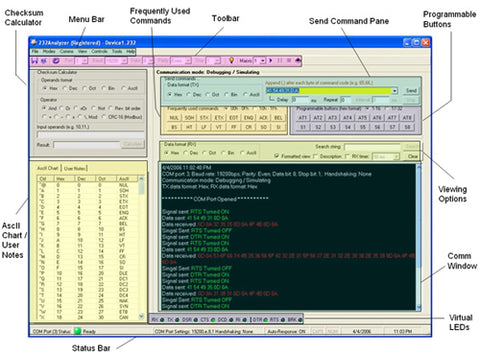
Designing / debugging a communication project can be very stressful and time-consuming. Many software / site engineers get stuck on the protocol before they can actually control a serial device, such as RS232, RS485, RS422, TTL, Modbus, PLC, or SCADA. Serial protocol can be very complicated; it requires that you not only understand the context of the protocol and the data format (ASCII, Hexadecimal, Binary, etc.), but you must also know how to do the Checksum calculation (the additional bytes added at the end of the data string to check the data integrity. Checksum Calculation varies from the simplest xOR to sophisticated CRC). Timing is also critical since some protocols require acknowledgment / response within milliseconds.
Designed to tackle all these problems, 232Analyzer (an advanced RS232 Protocol Analyzer) allows you to play with the protocol with all available data formats (ASCII, Hexadecimal, Decimal, Octal, and Binary). It also helps you verify the problem by monitoring the communications between two serial devices. As an example, 232Analyzer allows you to control and monitor (spy) serial port devices right from your PC. With 232Analyzer, even non-technical people can understand and play with the protocol within minutes.
232Analyzer comes with two communication modes: Debugging / Simulating and Monitoring. Debugging / Simulating mode (in which it functions as a Terminal, Debugger / Simulator) provides an easy way to test your command codes, from which you can send / receive commands / signals to / from external serial devices. Monitoring mode (both Half-Duplex and Full-Duplex are supported) allows you to monitor (spy) on communications between any other two serial devices. Timestamps in milliseconds are provided in this mode. All data communications are recorded and can be saved as .txt, .rtf or .doc files. Besides all formats of data inputs (Hexadecimal, Decimal, Octal, Binary, and ASCII), 232Analyzer also allows you to change / monitor RS-232's line states: RTS, DTR, CTS, DSR, DCD, and RI.
232Analyzer comes with an advanced Checksum Calculator that allows you to do the following calculations: Bit wise Logic Calculation: AND, OR, XOR, NOT, Reverse Bit Order Math Calculation: +, -, x, \, Mod CRC-16 (for Modbus) calculation.
232Analyzer also comes with many other advanced features for you to test / debug your serial devices:
- Programmable Buttons:
Programmable Buttons allows you to store command strings and signal controls into a single button with delay, repeat and interval options. You can also chain different buttons together, so that when the first button's commands are completed, it will continue to send commands that are stored in the following buttons. Programmable buttons are very useful as some devices need to receive a series of commands in order to perform certain tasks, such as moving a camera's pan / tilt head. There are a total of 32 programmable buttons. - Programmable Auto-Response:
Programmable Auto-Response allows the program to respond to certain incoming data. For example, when the program receives an Enquiry Code: 5, it can respond with Acknowledgment Code: 6. In addition to the code response, the program can also respond to line changes. For example, when the line state changes to DSR ON (external device is ready for receiving data), the program can send out the preset commands. Programmable Auto-Response is a useful feature that allows the user to communicate with the controlled device more effectively and precisely, especially since some controlled devices require a response within a certain timeframe, e.g. 500ms. There are a total of 16 numbers of Auto-Response. - Programmable Macros:
Programmable Macros is an advanced feature which provides an easy way for simulation and automation. There are a total of 8 Macros, each consists of 8 steps and 8 sub-routines. Steps are the running sequence of each Macro. There are two options in the Step: Send Commands (and/or Signals) or running Sub-Routines.- Send commands (and/or Signals) allows you to send out commands and/or signals with the options of Delay, Repeat, and Interval. There are a total of 8 Steps in each macro.
- Sub-Routine allows you to check the incoming data (and/or line state) or signal, then respond accordingly. Three conditions are checked: IF, ELSE IF and ELSE. There are a total of 8 Sub-Routines in each macro.
› Software Features
- Two communication modes: Debugging / Simulating and Monitoring (Half- or Full-Duplex)
- Send / Receive data in all formats: Hexadecimal, Decimal, Octal, Binary, and ASCII
- Timestamps in Monitoring mode
- Send / Receive signals: RTS, DTR, CTS, DSR, DCD and RI
- Customizable Color-coded Communication Logging Window
- COM 1 to 16
- Frequently Used Keys: 00h to 1Fh (a total of 32 numbers)
- Programmable Buttons: send command strings, signals or data sequence with the click of a single button (a total of 32 numbers)
- Programmable Auto-Response: Upon receiving certain data or signal, program automatically send out data, and/or signals (a total of 16 numbers)
- Programmable Macros: send sets of data / signals, response to different types of incoming data / signals with timer and sequence (a total of 8 x 8 Steps, and 8 x 8 Sub-routines)
- Virtual LEDs: View RS-232 line state, control RTS and DTR, Break communication if necessary
- Data Logging: All communications are logged and can be saved into .txt, .doc or .rtf file for future analysis
- Checksum Calculator: Logic, Math and CRC calculation
- Notation Converter: Convert data from one notation to another
- ASCII chart: All 256 ASCII code in different formats
- User Notes: User notes can be input
- Device Profile: Settings for different devices can be save individually
- Flexible screen adjustment
- User preferences settings: General, Startup Actions, Exit Actions, etc.
› Why 232Analyzer?
- Industry-proven
- Award-winning software product with thousands of satisfied customers
- More features than most of the hardware analyzers on the market
- Software price is only a fraction of the hardware analyzer's.
- Extremely easy to use, no programming knowledge required.
- Fast activation, no frustrated waiting time.
› Who Can Benefit From This Product?
- Programmers
- Software developers
- Hardware engineers
- System integrators
- Lab experts
- IT specialists
› What Applications Can This Product Be Used For?
- Serial hardware development
- Serial device driver development
- Serial protocol development, implementation, or reverse-engineering
- Software testing
- Hardware testing
- COM port testing
- External serial device control and monitoring
- etc.
› Where Can This Product Be Used?
- SCADA
- PLC
- Building Automation
- A/V Control
- Security Systems
- Communication Systems
- Other Industrial/Commercial Control and Automation Systems
- Other Systems or devices that use serial communications (RS-232 / 485 / 422)
- etc.