
3 easy steps to understand and control your RS232 devices
This article will explain the following topics in details:
1) Step 1: Understand RS232 Connection and Signals
2) Step 2: Learn about the Protocol
3) Step 3: Control your RS232 devices by using 232Analyzer
After reading this page, you should be able to understand most of the hardware and software (protocol) standards for RS232. If you have a chance to test your RS232 devices with the 232Analyzer software, you should be able to control your RS232 devices in a short period of time.
Step 1: Understand RS232 Connection & Signals
RS-232C, EIA RS-232, or simply RS-232, refers to the same standard defined by the Electronic Industries Association in 1969 for serial communication.
DTE and DCE
DTE stands for Data Terminal Equipment. A computer is a DTE. DCE stands for Data Communication Equipment. A modem is a DCE.
DTE normally comes with a Male Connector, while DCE comes with a Female Connector. However, that is not always true. Use the simple way below to confirm: Measure Pin 3 and Pin 5 of a DB-9 Connector with a Volt Meter, if you get a voltage of -3V to -15V, then it is a DTE device. If the voltage is on Pin 2, then it is a DCE device.
Note: The result for a DB-25 Connector is reversed (Please refer to DB-9 to DB-25 conversion table below).
RS-232 Pin outs (DB-9)
 A male DB-9 connector viewed from the front. Reverse or back view of male connector for Female Connector.
| DTE Pin Assignment (DB-9) | DCE Pin Assignment (DB-9) | ||||
|---|---|---|---|---|---|
| 1 | DCD | Data Carrier Detect | 1 | DCD | Data Carrier Detect |
| 2 | RxD | Receive Data | 2 | TxD | Transmit Data |
| 3 | TxD | Transmit Data | 3 | RxD | Receive Data |
| 4 | DTR | Data Terminal Ready | 4 | DSR | Data Set Ready |
| 5 | GND | Ground (Signal) | 5 | GND | Ground (Signal) |
| 6 | DSR | Data Set Ready | 6 | DTR | Data Terminal Ready |
| 7 | RTS | Request to Send | 7 | CTS | Clear to Send |
| 8 | CTS | Clear to Send | 8 | RTS | Request to Send |
| 9 | RI | Ring Indicator | 9 | RI | Ring Indicator |
DB-9 to DB-25 Conversion
| DB-9 | DB-25 | Function | |
|---|---|---|---|
| 1 | 8 | DCD | Data Carrier Detect |
| 2 | 3 | RxD | Receive Data |
| 3 | 2 | TxD | Transmit Data |
| 4 | 20 | DTR | Data Terminal Ready |
| 5 | 7 | GND | Ground (Signal) |
| 6 | 6 | DSR | Data Set Ready |
| 7 | 4 | RTS | Request to Send |
| 8 | 5 | CTS | Clear to Send |
| 9 | 22 | RI | Ring Indicator |
RS-232 Connections
A straight-through cable is used to connect a DTE (e.g. computer) to a DCE (e.g. modem), all signals in one side connected to the corresponding signals in the other side in a one-to-one basis. A crossover (null-modem) cable is used to connect two DTE directly, without a modem in between. They cross transmit and receive data signals between the two sides and there are many variations on how the other control signals are wired, below is one of them:
| Straight-through (DB-9) | Crossover (Null-Modem) (DB-9) | |||||||||
|---|---|---|---|---|---|---|---|---|---|---|
| (DTE) | (DCE) | (DTE) | (DTE) | |||||||
| 1 | DCD | ------- | DCD | 1 | 1 | DCD | DCD | 1 | ||
| 2 | RxD | ------- | TxD | 2 | 2 | RxD | ------- | TxD | 3 | |
| 3 | TxD | ------- | RxD | 3 | 3 | TxD | ------- | RxD | 2 | |
| 4 | DTR | ------- | DSR | 4 | 4 | DTR | ------- | DSR | 6 | |
| 5 | GND | ------- | GND | 5 | 5 | GND | ------- | GND | 5 | |
| 6 | DSR | ------- | DTR | 6 | 6 | DSR | ------- | DTR | 4 | |
| 7 | RTS | ------- | CTS | 7 | 7 | RTS | ------- | CTS | 8 | |
| 8 | CTS | ------- | RTS | 8 | 8 | CTS | ------- | RTS | 7 | |
| 9 | RI | ------- | RI | 9 | 9 | RI | RI | 9 | ||
RS-232 Signals

The graphic above illustrates a typical RS-232 logic waveform (Data format: 1 Start bit, 8 Data bits, No Parity, 1 Stop bit). The data transmission starts with a Start bit, followed by the data bits (LSB sent first and MSB sent last), and ends with a "Stop" bit.
The voltage of Logic "1" (Mark) is between -3VDC to -15VDC, while the Logic "0" (Space) is between +3VDC to +15VDC.
RS-232 connects the Ground of 2 different devices together, which is the so-called "Unbalanced" connection. An unbalanced connection is more susceptible to noise, and has a distance limitation of 50 ft (which is around 15 meters).
Step 2: Learn about the Protocol
A protocol is one or a few sets of hardware and software rules agreed to by all communication parties for exchanging data correctly and efficiently.
Synchronous and Asynchronous Communications
Synchronous Communication requires the sender and receiver to share the same clock. The sender provides a timing signal to the receiver so that the receiver knows when to "read" the data. Synchronous Communication generally has higher data rates and greater error-checking capability. A printer is a form of Synchronous Communication.
Asynchronous Communication has no timing signal or clock. Instead, it inserts Start / Stop bits into each byte of data to "synchronize" the communication. As it uses less wires for communication (no clock signals), Asynchronous Communication is simpler and more cost-effective. RS-232 / RS-485 / RS-422 / TTL are the forms of Asynchronous Communications.
Drilling Down: Bits and Bytes
Internal computer communications consists of digital electronics, represented by only two conditions: ON or OFF. We represent these with two numbers: 0 and 1, which in the binary system is termed a Bit.
A Byte consists of 8 bits, which represents decimal number 0 to 255, or Hexadecimal number 0 to FF. As described above, a byte is the basic unit of Asynchronous communications.
Baud rate, Data bits, Parity, and Stop bit

The baud rate is the communication speed that measures the number of bit transfers per second. For example, 19200 baud is 19200 bits per second.
Data bits are a measurement of the actual data bits in a communication packet. For example, the above graphic shows eight (8) data bits in a communication packet. A communication packet refers to a single byte transfer, including Start / Stop bits, Data bits and Parity. If you are transferring a standard ASCII code (0 to 127), 7 data bits are enough. If it is an extended ASCII code (128 to 255), then 8 data bits are required.
Parity is a simple way to error-check. There are Even, Odd, Mark and Space indicators. You can also use no parity. For Even and Odd parity, the serial port sets the parity bit (the last bit after the data bit) to a value to ensure that the data packet has an Even or Odd number of logic-high bits. For example, if the data is 10010010, for Even parity, the serial port sets the parity bit as 1 to keep the number of logic-high bits Even. For Odd parity, the parity bit is 0 so that the number of logic-high bits is Odd. Mark parity simply sets the parity bit to logic-high and Space sets the parity bit to logic-low, so that the receiving party can determine if the data is corrupted.
Stop bits are used to signal the end of a communication packet. This also helps to synchronize different clocks on the serial devices.
Handshaking (Flow Control)
Handshaking is also called "Flow Control". The main purpose of Handshaking is to prevent receiver overloading. By using Handshaking signals, receivers will be able to tell the sending device to pause data transmission if the receiver is overloaded. There are three types of handshaking: Software handshaking, Hardware handshaking and Both.
Software handshaking uses two control characters: XON and XOFF. The receiver sends these control characters to pause transmitter during communication. XON is decimal 17 and XOFF is decimal 19 in the ASCII chart. The drawback of Software handshaking is that these two control characters can not be used in data. This is quite important when you are transmitting Binary data as you might need to use these two codes in your data.
Hardware handshaking makes use of actual hardware lines, such as RTS / CTS, DTR / DSR, and DCD / RI (for modem).
In DTE / DCE communication, RTS (Request to Send) is an output on the DTE and input on the DCE. CTS (Clear to Send) is the answering signal coming from the DCE. Before sending a data, the DTE asks permission by setting its RTS output to high. No data will be sent until the DCE grants permission by using the CTS line. The DTE uses the DTR (Data Terminal Ready) signal to indicate it is ready to accept information, whereas the DCE uses the DSR signal for the same purpose. DTR/DSR are normally ON or OFF for the whole connection session (e.g. Off-hook), while RTS/CTS are ON or OFF for each data transmission. DCD (Data Carrier Ready) is used by the modem when a connection has been established with remote equipment, while RI (Ring Indicator) is used by the modem to indicate a ring signal from telephone line.
Data formats (Binary, Hex, Dec, Oct, and ASCII)
Serial devices use Binary for communication, which consists of just two unique numbers: 0 and 1.
Binary is the Base-2 numbering system. One byte of data consists of 8 binary digits, from 0000 0000 to 1111 1111. Hexadecimal is the base-16 system, which consists of 16 numbers: 0 to 9 and the letters A to F (decimal number 15).
The Hexadecimal numbering system is useful because it can represent every byte as two consecutive hexadecimal digits, and it is easier for humans to read Hexadecimal numbers than Binary numbers. Most of the manufacturers use Hexadecimal in their protocol documentation. It is simple to convert a value from Hexadecimal to Binary. Just translate each Hexadecimal digit into its 4-bit binary equivalent. E.g. Hexadecimal number F3 equals Binary number 1111 0011.
Decimal refers to numbers in base 10, which is the numbering system we use most in everyday life. It's not as easy as Hexadecimal and Octal to converter Decimal to Binary number, but it is easier for us to understand Decimal.
Octal refers to the base-8 numbering system, which uses just eight unique symbols (0 to 7). Programmers often use Octal format because it is relatively easy for people to read and can easily be translated into binary format: each Octal digit represents 3 binary digits. E.g. Octal number 73 equals to Binary number 111 011.
ASCII (American Standard Code for Information Interchange) is a character encoding based on the English alphabet. ASCII codes (both readable and unreadable) are widely used in communications, such as Modem communications. Letters A to Z and numbers 0 to 9 are readable ASCII codes. Some ASCII codes are unreadable, such as the control codes: XON and XOFF, which are used in Software flow control.
Checksum
Many serial protocols use checksum (additional bytes added at the end of the data string) to check the data integrity, as errors might occur during data transmission. There are many types of checksum, from the simplest uses of it in Modula or BCC to sophisticated CRC calculation. Using Modula as an example, we learn that before data transmission, the sender adds all command bytes together then mod it by 255 (decimal) to get an additional byte. This is to be added at the end of the command string. When the receiver receives the command string, it will first check the added byte to see whether data remain unchanged or not. If that is the case, it will accept the data, and if not, it will ask the sender to resend the data.
Examples of protocol commands
A protocol command is a data string sent from one serial device (e.g. a Computer) to another (i.e. a Modem). Here are some examples:
ASCII command example: ATI1
Convert the command string above to Hexadecimal and it becomes: 41 54 49 31 0D 0A
Convert the command string above to Decimal and it becomes: 065 084 073 049 013 010
Convert the command string above to Octal and it becomes: 101 124 111 061 015 012
Convert the command string above to Binary and it becomes: 01000001 01010100 01001001 00110001 00001101 00001010
Step 3: Control your RS232 devices by using 232Analyzer
232Analyzer is an Advanced Serial Port Protocol Analyzer software, which allows you to control / debug, monitor / sniff serial devices (RS-232 / RS-485 / RS-422 / TTL) right from your PC. 232Analyzer is a shareware, the FREE version has some limitation but is more than enough to test and control your serial devices. Click here to download a FREE copy.
Checksum calculation
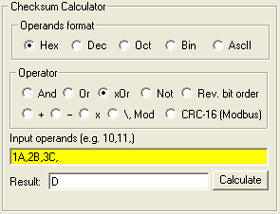
232Analyzer comes with a Checksum calculator, which allows you to calculate the complicated checksum byte in seconds, here is an example:
Suppose that you are controlling a projector, and the projector protocol uses xOR to get the additional checksum byte, the command string to turn ON the projector is: "1A 2B 3C" plus the Checksum byte. Use the following procedures to calculate the Checksum byte:
- Select Hex as an operands format
- Select xOr as an operator
- Key in the command string and append a comma (,) after each byte of command code: e.g. 1A,2B,3C,
- Click on the "Calculate" button and you will get the result of 0D (0 is omitted)
Select COM port and Setup communication formats

From the above toolbar example, the COM port connected to the projector has been set as: COM port: 5, Baud Rate: 19,200 bps, Data bit: 8, Parity: Even, Stop bit: 1.
Note: After you have set up the correct communication formats (they must match with the projector's COM port settings), click on the "Connect" button on the left to activate the COM port.
Flow control settings
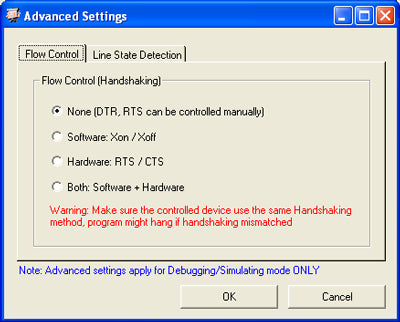
Flow control can be set from the window above. Either Software (XON / XOFF), Hardware (RTS / CTS), Both (Software + Hardware), or None can be selected.
Control your RS232 devices
-
Control / Monitor Line States

232Analyzer allows you to control / monitor line states of your COM ports.
- Line states of RTS and DTR will be toggled when the respective LED is clicked, you can use a voltage-meter to verify the changes, you should get +6V to +15V when the line state is ON, and -6V to -15V when the line state is OFF.
- Other line states can be monitored through the Virtual Ds, such as RX, TX, DSR, CTS, DCD and RI.
-
Send / Receive commands
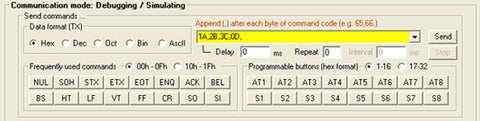
Use the above example to control a projector (turn ON the projector), key in the complete command string "1A,2B,3C,0D," into the Send_Command_Pane as shown above, and then click on the "Send" button...
Notes:
- In the FREE version, Hex mode is not available. You can use Decimal format to send out the command string: "26,43,60,13,"
- You can use any RS-232 device for testing, as long as you know the protocol commands.

