
Serial Port Monitor
Serial port monitor is one of the most important features available in the 232Analyzer software. It allows data monitoring in Hexadecimal, Decimal, Octal, Binary or ASCII format. All data flows are logged in the Communication Window, which can be saved as .txt, .doc or .rtf files for further analysis. Not just designed to monitor RS-232 communication, with the right type of serial converters, such as CommFront's CVT-485-1, CVT-485_422-1, TTL-232-1 and TTL33-232-1, 232Analyzer can also be used to monitor RS-485, RS-422 and TTL communications. All monitoring modes available in 232Analyzer software come with timestamps in milliseconds.
Click on the link below for the details of how to:
1) Monitor RS232
2) Monitor RS485 (2-wire)
3) Monitor RS422 (4-wire)
4) Monitor TTL
1) Serial Port Monitor: RS232 Monitor (RS232 Sniffer)
With Direction Indication
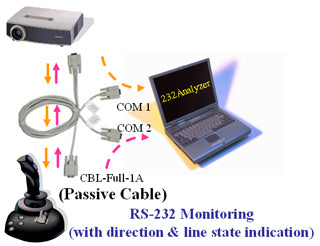
By using a Full-Duplex monitor cable (CBL-Full-1A), the 232Analyzer software can capture not only the data and signals flowing between the RS232 devices but also the data direction.
Hardware accessories required:
- 1x CBL-Full-1A (Full-duplex RS232 monitor / control cable)
- 1x USB-232A-1 (USB to dual RS232 converter)
Without Direction Indication
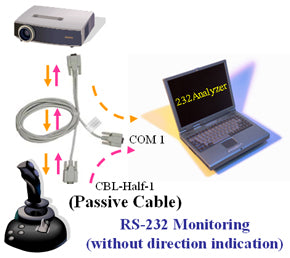
Together with a Half-Duplex monitor cable (CBL-Half-1), the 232Analyzer software can capture the data flowing between the RS232 devices.
Note: No data direction will be indicated in the 232Analyzer software.
Hardware accessories required:
- 1x CBL-Full-1A (Full-duplex RS232 monitor / control cable)
- 1x USB-232A-1 (USB to dual RS232 converter)
2) Serial Port Monitor: RS485 Monitor (RS485 Sniffer)
With Direction Indication
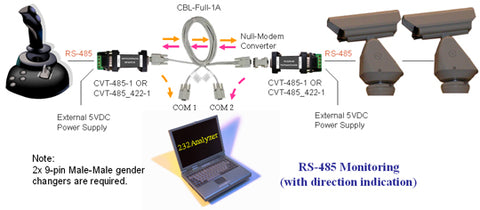
By using two units of RS-232 / RS-485 converters (CVT-485-1 or CVT-485_422-1) and a Full-Duplex monitor cable (CBL-Full-1A), the 232Analyzer software can capture not only the data flowing between the RS485 devices, but also the data direction. Connect 485+ and 485- of the serial devices to A+ and B- of the converter respectively. Switch to Full-Duplex monitoring mode in the 232Analyzer software.
Note: The CVT-485-1 and CVT-485_422-1 are port-powered converters; although they can accept external 5VDC power supply, it will damage the converter if the polarity is reversed or the voltage is 5% higher than 5VDC, so be very careful when using the external 5VDC power adapter.
Hardware accessories required:
- 1x CBL-Full-1A (Full-duplex RS232 monitor / control cable)
- 1x USB-232A-1 (USB to dual RS232 converter)
- 2x CVT-485-1 (Port-powered RS232 RS485 converter)
- 2x PWR-5_US-2 (5V DC regulated power adapter)
- 2x GCH-9_MM-1 (9 pin male-male gender changer)
Without Direction Indication
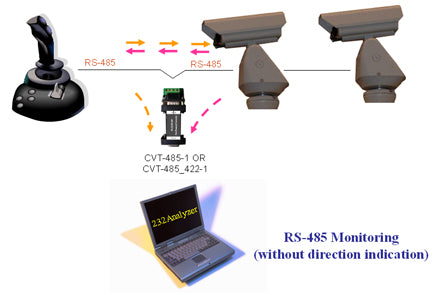
Use a RS-232 / RS-485 converter (CVT-485-1 or CVT-485_422-1) to capture the data flowing between the RS-485 serial devices. Connect 485+ and 485- of the serial devices to A+ and B- of the converter respectively.
Note: No data direction will be indicated in the 232Analyzer software.
Hardware accessories required:
- 1x USB-232-1 (USB to single RS232 converter)
- 1x CVT-485-1 (Port-powered RS232 RS485 converter)
3) Serial Port Monitor: RS422 Monitor (RS422 Sniffer)
With Direction Indication
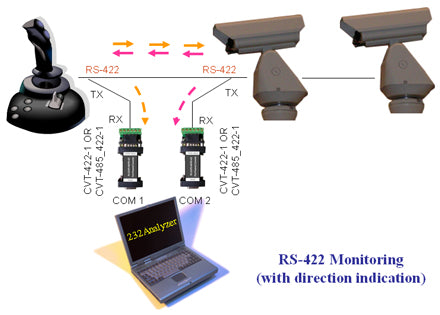
By using two units of RS-232 / RS-422 converters (CVT-485_422-1), the 232Analyzer software can capture not only the data flowing between the RS422 devices but also the data direction. Connect TX+ and TX- of the serial devices to RX+ and RX- of the converters for both sides of the connections. Switch to Full-Duplex monitoring mode in the 232Analyzer software.
Hardware accessories required:
- 1x USB-232A-1 (USB to dual RS232 converter)
- 2x CVT-485_422-1 (Port-powered RS232 to RS485 / RS422 converter)
4) Serial Port Monitor: TTL Monitor (TTL Sniffer)
With Direction Indication
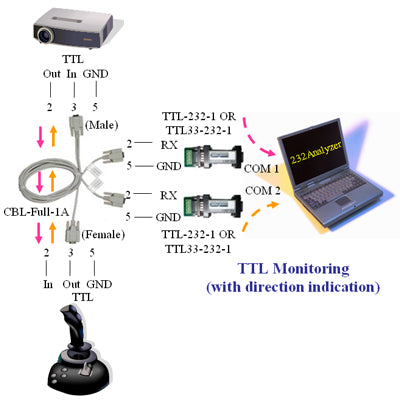
By using a Full-Duplex Monitor cable (CBL-Full-1A) and two units of RS-232 / TTL converters (TTL-232-1 or TTL33-232-1), the 232Analyzer software can capture not only the data flowing between the TTL devices but also the data direction.
Hardware accessories required:
- 1x CBL-Full-1A (Full duplex RS232 monitor / control cable)
- 1x USB-232A-1 (USB to dual RS232 converter)
- 2x TTL-232-1 (Port-powered RS232 to TTL 5V converter) or 2x TTL33-232-1 (Port-powered RS232 to TTL 3.3V converter)