
Serial Port Terminal
Serial port terminal is another important feature available in the 232Analyzer software. It allows you to control RS-232 devices right from your PC - with various combinations of COM port settings (Port, Baud rate, Data bit, Parity, Stop bit, and Flow control), and the Line state controls (RTS and DTR). Controlling an RS-232 device is just that simple, no programming or technical background is required. With the right type of serial converters, such as CommFront's CVT-485-1, CVT-485_422-1, TTL-232-1 and TTL33-232-1, it is also possible to control other serial devices such as RS-485, RS-422 or TTL, which have different electrical signals but follow the RS-232 communication mechanism. Also supported are the Virtual COM ports when you are using USB-Serial adapters or Bluetooth Serial Port devices. Virtually any kind of serial device can be controlled from the 232Analyzer, including devices from Industrial SCADA, PLC systems, Commercial Building Automation systems, Pro-Sound Mixers, and AV Matrix Switchers, as well as CCTV cameras and Access Control systems.
Click on the link below for the details of how to:
1) Control / debug RS232 devices
2) Control / debug RS485 / RS422 devices
3) Control TTL devices
1) Serial Port Terminal: Control / debug RS232 devices
Control a DCE device
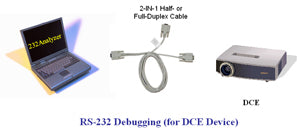
Use a straight-through cable (Half- or Full-Duplex Monitor cable) to control a DCE device.
List of hardware accessories required:
- 1x USB-232-1 (USB to single RS232 converter)
- 1x CBL-Half-1 (Half-duplex RS232 monitor / control cable) or 1x CBL-Full-1A (Full-duplex RS232 monitor / control cable)
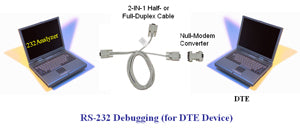
Use a straight-through cable (Half- or Full-Duplex Monitor cable) and a Null-Modem converter to control a DTE device.
List of hardware accessories required:
- 1x USB-232-1 (USB to single RS232 converter)
- 1x CBL-Half-1 (Half-duplex RS232 monitor / control cable) or 1x CBL-Full-1A (Full-duplex RS232 monitor / control cable)
- 1x Null-modem adapter
2) Serial Terminal: Control / debug RS485/RS422 devices
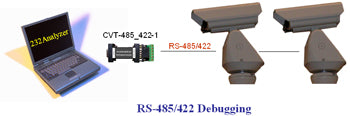
Connect an RS232 / RS485 / RS422 converter (CVT-485_422-1) to PC's COM port to control / debug your RS485 / RS422 devices. If there is no COM port on your computer, use the USB to RS232 converter such as CommFront's USB-232-1.
List of hardware accessories required:
- 1x USB-232-1 (USB to single RS232 converter)
- 1x CVT-485_422-1 (Port-powered RS232 RS485 RS422 converter)
3) Serial Port Terminal: Control / debug TTL devices
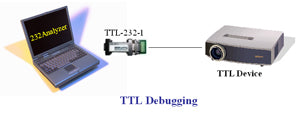
Connect a RS-232 / TTL converter (TTL-232-1 or TTL33-232-1) to PC's COM port to control / debug TTL devices.
List of hardware accessories required:
- 1x USB-232-1 (USB to single RS232 converter).
- 1x TTL-232-1 (Port-powered RS232 to TTL 5V converter) or 1x TTL33-232-1 (Port-powered RS232 to TTL 3.3V converter)