
RS232 / RS485 / RS422 to Fiber Optic Converters
Our rugged, industrial-grade, point-to-point RS232 / RS485 / RS422 serial to fiber optic converters work in pairs to extend serial signals (RS232, RS485, RS422, and TTL) over long distance. These point-to-point RS232 / RS485 / RS422 serial to fiber optic converters have been designed for harsh industrial environments and withstand a wide temperature of -40°F to 185°F (-40°C to 85°C), and they come with the options of multi-mode (extend distance up to 3 miles / 5km) and single-mode (extend distance up to 25 miles / 40 km), and ST, SC, and FC connectors.
SAFETY

WORLD-CLASS TESTING LABS
CommFront products are strictly certified by SGS and/or TUV - the Nationally Recognized Testing Laboratories [NRTLs] in North America (approved by OSHA) and the Notified Bodies in the European Union. Learn More
QUALITY

ISO 9001 STANDARDS
CommFront products are designed and manufactured to ISO 9001 standards. Our quality control system is strictly certified by SGS (Cert No. SG12/04213). Learn More
WARRANTY

100% SATISFACTION
CommFront products have been proven to be reliable. We back our high-quality products with a 5-year replacement warranty and a 30-day risk-free money-back guarantee. Learn More
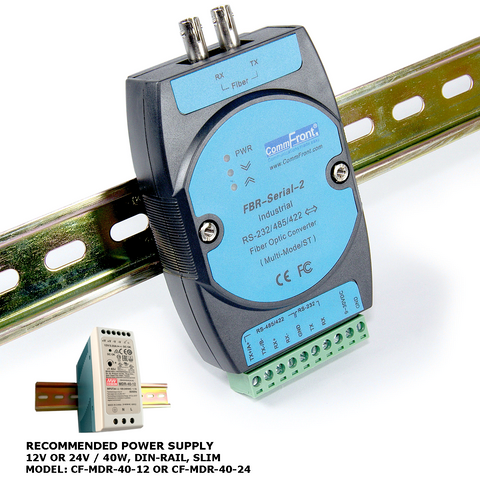
RS232 / RS485 / RS422 to Fiber Optic Converter (Industrial / MultiMode / ST)
- Rugged industrial-grade RS232 / RS485 / RS422 to fiber optic converter.
- Transmits serial data (RS232, RS485 or RS422) over long distances through fiber links (multi-mode: 3 miles or 5 km).
- Standards can be mixed and matched (same data type; one side RS232 and the other side RS485 or RS422; one side RS485 and the other side RS422, etc.).
- Industrial grade enclosed in a rugged, rustless ABS housing.
- Supports serial data rates from 300 to 115,200bps.
- Supports multi-drop RS485 / RS422 networks (up to 128 nodes).
- Direct DIN-Rail (Rack) or Wall / Panel mounting (stackable).
- Plug and play (hot-pluggable; data format auto-sensing and self-adjusting).
- Data direction auto-turnaround.
- No software drivers, DIP switch or jumper settings required.
- Multi-mode with ST connectors.
- Supports a wide range of fiber optic cables.
- Operating temperature: -40ºF to 185ºF (-40ºC to 85ºC).
- Built-in 600W surge protection, 15kV static protection and circuit protection.
- Surface Mount Technology manufactured to RoHS and ISO-9001 standards.
- Safety: Strictly certified by TUV (Cert No. SG-CE-100005; SG-FCC-100002).
- 5-year manufacturer's warranty.
In Stock
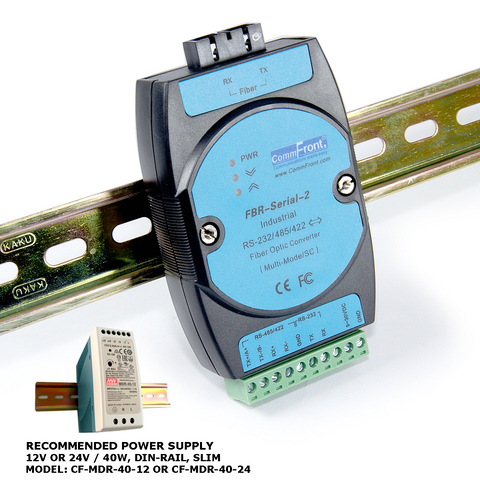
RS232 / RS485 / RS422 to Fiber Optic Converter (Industrial / MultiMode / SC)
- Rugged industrial-grade RS232 / RS485 / RS422 to fiber optic converter.
- Transmits serial data (RS232, RS485 or RS422) over long distances through fiber links (multi-mode: 3 miles or 5 km).
- Standards can be mixed and matched (same data type; one side RS232 and the other side RS485 or RS422; one side RS485 and the other side RS422, etc.).
- Industrial grade enclosed in a rugged, rustless ABS housing.
- Supports serial data rates from 300 to 115,200bps.
- Supports multi-drop RS485 / RS422 networks (up to 128 nodes).
- Direct DIN-Rail (Rack) or Wall / Panel mounting (stackable).
- Plug and play (hot-pluggable; data format auto-sensing and self-adjusting).
- Data direction auto-turnaround.
- No software drivers, DIP switch or jumper settings required.
- Multi-mode with SC connectors.
- Supports a wide range of fiber optic cables.
- Operating temperature: -40ºF to 185ºF (-40ºC to 85ºC).
- Built-in 600W surge protection, 15kV static protection and circuit protection.
- Surface Mount Technology manufactured to RoHS and ISO-9001 standards.
- Safety: Strictly certified by TUV (Cert No. SG-CE-100005; SG-FCC-100002).
- 5-year manufacturer's warranty.
In Stock
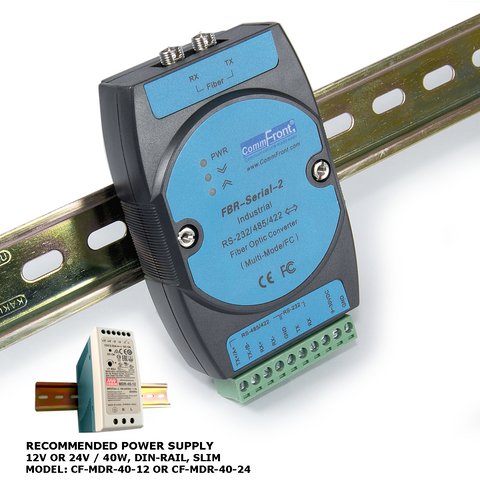
RS232 / RS485 / RS422 to Fiber Optic Converter (Industrial / MultiMode / FC)
- Rugged industrial-grade RS232 / RS485 / RS422 to fiber optic converter.
- Transmits serial data (RS232, RS485 or RS422) over long distances through fiber links (multi-mode: 3 miles or 5 km).
- Standards can be mixed and matched (same data type; one side RS232 and the other side RS485 or RS422; one side RS485 and the other side RS422, etc.).
- Industrial grade enclosed in a rugged, rustless ABS housing.
- Supports serial data rates from 300 to 115,200bps.
- Supports multi-drop RS485 / RS422 networks (up to 128 nodes).
- Direct DIN-Rail (Rack) or Wall / Panel mounting (stackable).
- Plug and play (hot-pluggable; data format auto-sensing and self-adjusting).
- Data direction auto-turnaround.
- No software drivers, DIP switch or jumper settings required.
- Multi-mode with FC connectors.
- Supports a wide range of fiber optic cables.
- Operating temperature: -40ºF to 185ºF (-40ºC to 85ºC).
- Built-in 600W surge protection, 15kV static protection and circuit protection.
- Surface Mount Technology manufactured to RoHS and ISO-9001 standards.
- Safety: Strictly certified by TUV (Cert No. SG-CE-100005; SG-FCC-100002).
- 5-year manufacturer's warranty.
In Stock
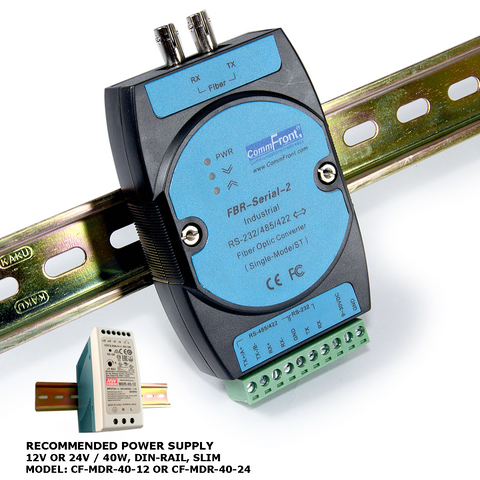
RS232 / RS485 / RS422 to Fiber Optic Converter (Industrial / SingleMode / ST)
- Rugged industrial-grade RS232 / RS485 / RS422 to fiber optic converter.
- Transmits serial data (RS232, RS485 or RS422) over long distances through fiber links (single-mode: 25 miles or 40 km).
- Standards can be mixed and matched (same data type; one side RS232 and the other side RS485 or RS422; one side RS485 and the other side RS422, etc.).
- Industrial grade enclosed in a rugged, rustless ABS housing.
- Supports serial data rates from 300 to 115,200bps.
- Supports multi-drop RS485 / RS422 networks (up to 128 nodes).
- Direct DIN-Rail (Rack) or Wall / Panel mounting (stackable).
- Plug and play (hot-pluggable; data format auto-sensing and self-adjusting).
- Data direction auto-turnaround.
- No software drivers, DIP switch or jumper settings required.
- Single mode with ST connectors.
- Supports a wide range of fiber optic cables.
- Operating temperature: -40ºF to 185ºF (-40ºC to 85ºC).
- Built-in 600W surge protection, 15kV static protection and circuit protection.
- Surface Mount Technology manufactured to RoHS and ISO-9001 standards.
- Safety: Strictly certified by TUV (Cert No. SG-CE-100005; SG-FCC-100002).
- 5-year manufacturer's warranty.
In Stock
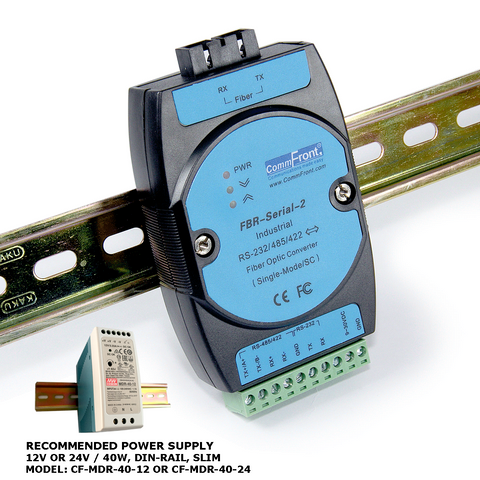
RS232 / RS485 / RS422 to Fiber Optic Converter (Industrial / SingleMode / SC)
- Rugged industrial-grade RS232 / RS485 / RS422 to fiber optic converter.
- Transmits serial data (RS232, RS485 or RS422) over long distances through fiber links (single-mode: 25 miles or 40 km).
- Standards can be mixed and matched (same data type; one side RS232 and the other side RS485 or RS422; one side RS485 and the other side RS422, etc.).
- Industrial grade enclosed in a rugged, rustless ABS housing.
- Supports serial data rates from 300 to 115,200bps.
- Supports multi-drop RS485 / RS422 networks (up to 128 nodes).
- Direct DIN-Rail (Rack) or Wall / Panel mounting (stackable).
- Plug and play (hot-pluggable; data format auto-sensing and self-adjusting).
- Data direction auto-turnaround.
- No software drivers, DIP switch or jumper settings required.
- Single mode with SC connectors.
- Supports a wide range of fiber optic cables.
- Operating temperature: -40ºF to 185ºF (-40ºC to 85ºC).
- Built-in 600W surge protection, 15kV static protection and circuit protection.
- Surface Mount Technology manufactured to RoHS and ISO-9001 standards.
- Safety: Strictly certified by TUV (Cert No. SG-CE-100005; SG-FCC-100002).
- 5-year manufacturer's warranty.
In Stock
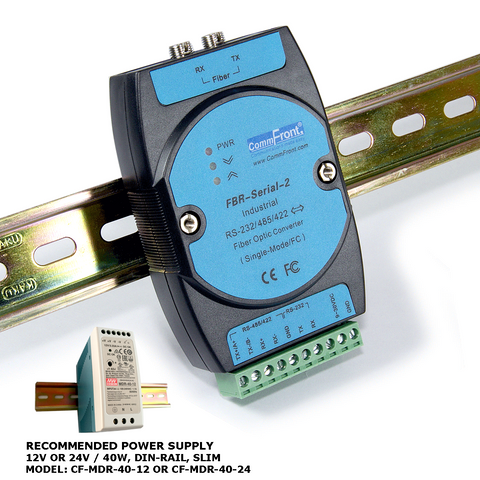
RS232 / RS485 / RS422 to Fiber Optic Converter (Industrial / SingleMode / FC)
- Rugged industrial-grade RS232 / RS485 / RS422 to fiber optic converter.
- Transmits serial data (RS232, RS485 or RS422) over long distances through fiber links (single-mode: 25 miles or 40 km).
- Standards can be mixed and matched (same data type; one side RS232 and the other side RS485 or RS422; one side RS485 and the other side RS422, etc.).
- Industrial grade enclosed in a rugged, rustless ABS housing.
- Supports serial data rates from 300 to 115,200bps.
- Supports multi-drop RS485 / RS422 networks (up to 128 nodes).
- Direct DIN-Rail (Rack) or Wall / Panel mounting (stackable).
- Plug and play (hot-pluggable; data format auto-sensing and self-adjusting).
- Data direction auto-turnaround.
- No software drivers, DIP switch or jumper settings required.
- Single mode with FC connectors.
- Supports a wide range of fiber optic cables.
- Operating temperature: -40ºF to 185ºF (-40ºC to 85ºC).
- Built-in 600W surge protection, 15kV static protection and circuit protection.
- Surface Mount Technology manufactured to RoHS and ISO-9001 standards.
- Safety: Strictly certified by TUV (Cert No. SG-CE-100005; SG-FCC-100002).
- 5-year manufacturer's warranty.
In Stock