

Details
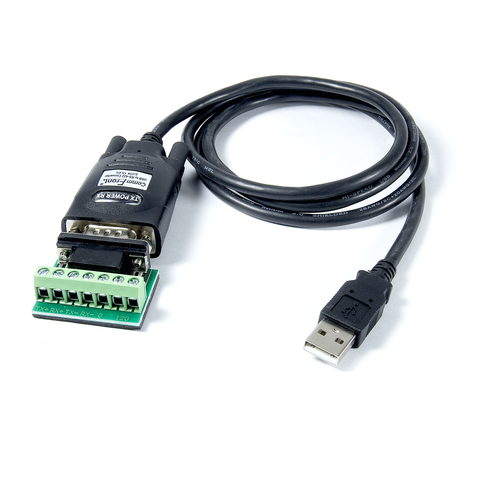
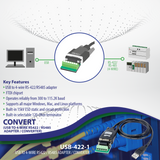
The USB-422-1 is a port-powered, bi-directional, integrated USB to 4-wire RS422 / RS485 adapter / converter that can be used to convert any standard full-duplex USB port into a four-wire full-duplex RS422 / RS485 port and vice versa. This high-quality, high-performance USB to RS422 converter can be used to communicate with one loop of up to 256 units of RS422 / RS485 devices, and it comes with a built-in selectable 120-Ohm terminator for system reliability and easy installation (see Application Note). The USB to RS422 adapter is powered from the USB port and it supports data auto-sensing & self-adjusting, no baud rate setting is required. And with the data direction auto-turnaround technology, no external power or flow control is required for RS485 communications. The unit uses the latest FTDI chipset and is fully compatible with Windows 11 / 10 / 8 / 7 / Vista / XP / Server2008 / Server2003 / 2000 / 98 (32-bit), Windows 11 / 10 / 8 / 7 / Vista / XP / Server2008 /Server2003 (64-bit), Win CE, Mac, Linux, and Raspberry Pi.
CommFront's products quality is ensured by our ISO-9001 quality control system (Cert No. SG12/04213, strictly certified by SGS), and we back our high-quality products with a 5-year replacement warranty and a 30-day risk-free money-back guarantee.
Features
- USB to RS422/RS485 adapter / converter.
- Adds one 4-wire RS-422 / RS-485 port to your USB port.
- 300 to 3M Baud operation (auto-sensing and self-adjusting).
- Communicate with one loop of up to 256 units of RS422 / RS485 devices.
- Built-in selectable 120Ω end-of-line terminator for system reliability and easy installation.
- Built-in 15kV ESD static and circuit protection.
- The full-duplex USB to full-duplex RS-422 / RS-485 communications requires no data direction auto-turnaround and flow control.
- Supports Windows 11 / 10 / 8 / 7 / Vista / XP / Server2008 / Server2003 / 2000 / 98 (32-bit), Windows 11 / 10 / 8 / 7 / Vista / XP / Server2008 / Server2003 (64-bit), Win CE, Mac, Linux, and Raspberry Pi.
- Supports remote wakeup and power management.
- Plug and play (hot-pluggable, data format auto-sensing and self-adjusting).
- Port-powered, no external power required.
- No IRQs required, no IRQ conflicts.
- Surface Mount Technology manufactured to RoHS and ISO-9001 standards.
- Safety: Strictly certified by world-class lab SGS / TUV (Cert No. E1/2013/90006C; E1/2013/90007C).
- 5-year manufacturer's warranty.
Specifications
| Part Number: | USB-422-1 |
| Compatibility: | USB 2.0 (backward compatible) and EIA/TIA RS-485 / RS-422 standards |
| Power Source: | From USB port |
| Current Consumption: | Less than 60mA |
| Cable length: | 3.3 ft (1 m) |
| Baud Rates: | 300 to 3M bps (Auto-sensing & Self-adjusting) |
| Distance: | USB side: 10ft (3m); RS-485 side: Depending on the power from USB port, will transmit up to 4000ft (1.2km) at 19,200bps |
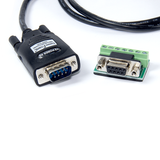
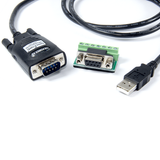
| Connector: | USB side: Type A Male; RS-422 / RS-485 side: DB-9 Male and a 7-Way Terminal Block |
| Maximum number of drops: | 256 |
| End of Line Terminator: | 120Ω (Built-in, selectable) |
| Dimensions (H x W x D): | 0.8 x 1.4 x 3.6 in (20 x 36 x 92 mm) (excluding cable) |
| Weight: | 4.2 oz (118 g) |
| Operating Temperature: | 32ºF to 104ºF (0ºC to 40ºC) |
| Operating Humidity: | Up to 90% RH (no condensation) |
Downloads


Compliances
Safety

WORLD-CLASS TESTING LABS
CommFront products are strictly certified by SGS and/or TUV - the Nationally Recognized Testing Laboratories [NRTLs] in North America (approved by OSHA) and the Notified Bodies in the European Union. Learn More
Quality

DESIGNED & MANUFACTURED TO ISO STANDARDS
CommFront products are designed and manufactured to ISO 9001 standards. Our quality control system is strictly certified by SGS (Cert No. SG12/04213). Learn More
Warranty

100% SATISFACTION
CommFront products have been proven to be reliable. We back our high-quality products with a 5-year replacement warranty and a 30-day risk-free money-back guarantee. Learn More
We Also Recommend
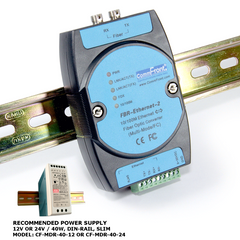
FBR-Ethernet-2 (MM/FC)
10 / 100M Ethernet to Fiber Optic Media Converter (Industrial / MultiMode / FC)
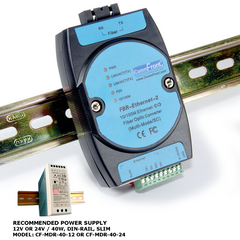
FBR-Ethernet-2 (MM/SC)